
There was a time when capturing high-quality photographs meant lugging around a hefty Digital Single-Lens Reflex (DSLR) camera, complete with multiple lenses and accessories. However, the world of photography has undergone a significant transformation, largely propelled by the incredible advancements in smartphone technology. For many, the iPhone has become the go-to device for stunning visual storytelling, offering a blend of convenience, power, and instant shareability that traditional cameras often can’t match. This shift was a primary motivation for embracing the iPhone; it wasn’t just about making calls or sending messages, but about unlocking a universe of creative possibilities through its vibrant ecosystem of camera applications.
Indeed, since acquiring my iPhone several months ago, I’ve noticed a considerable reduction in my reliance on my DSLR. The sheer convenience of having a powerful camera always in my pocket, ready to capture life’s fleeting moments, is unparalleled. But beyond mere portability, the iPhone’s true magic lies in its ability to facilitate instant sharing. Snapping a beautiful photo and sharing it with friends and family across social media platforms within seconds has revolutionized how we document and experience our lives. This instant gratification and seamless connectivity are huge advantages, making the iPhone an indispensable tool for both casual snappers and aspiring photographers alike.
Unlocking Creativity: My Favorite iPhone Camera & Editing Apps
The iPhone’s native camera is impressive on its own, but it’s the vast array of third-party applications that truly elevate its photographic capabilities. These apps transform your device into a versatile toolkit, offering everything from advanced shooting controls to professional-grade editing features. Below, I share my top picks for iPhone camera and editing apps that have become essential in my mobile photography workflow, helping me capture, enhance, and share my visual stories with ease and flair.

1. Instagram: The Ultimate Visual Storytelling Platform
Without a doubt, Instagram holds the top spot as my absolute favorite among all camera apps. If you spend any time on social media platforms like Twitter or Facebook, you’ve almost certainly encountered the distinctive, often retro-filtered, images that are synonymous with Instagram. It’s more than just an app; it’s a dynamic community and a brilliantly fast, beautiful, and fun method to encapsulate and share your daily experiences through a series of captivating pictures. The workflow is incredibly intuitive: simply snap a photo with your iPhone, select from a diverse range of artistic filters to instantly transform the image’s mood and aesthetic, and then effortlessly share it across your connected social networks like Facebook, Twitter, or Flickr. What truly makes Instagram special is its interactive nature, allowing other Instagram users to ‘like’ your photos or leave comments, fostering a vibrant exchange of creativity and connection. Best of all, this powerful tool comes at an unbeatable FREE! price point, making it accessible to everyone.

TidyMom on Instagram
While interacting directly with Instagram photos—such as leaving comments—traditionally required an iPhone and the Instagram app itself, the emergence of innovative platforms like Webstagram has opened up new avenues. Webstagram provides a fantastic web-based gallery where you can browse and enjoy the Instagram photos of your favorite users, and even participate by leaving comments, bridging the gap for those who might not always have their phone at hand or prefer a desktop viewing experience. This addition makes the Instagram experience even more inclusive and expansive, further solidifying its role as a leading platform for visual sharing.

2. Camera+: Elevating Your iPhone’s Native Camera Experience
When it comes to actually capturing images, Camera+ is my absolute workhorse. This powerful app is responsible for taking approximately 99% of all my pictures, even when my ultimate goal is to upload them to Instagram. Its robust feature set and intuitive controls make it a superior choice compared to the iPhone’s default camera application. Camera+ is meticulously designed to provide users with a more professional and precise shooting experience, offering an array of functionalities that significantly enhance photo quality and creative control. From advanced exposure and focus adjustments to a brilliant image stabilizer that minimizes blur, this app ensures you get the best possible shot every time. One of its standout features, and a personal favorite, is the inclusion of a built-in timer, which is incredibly useful for self-portraits, group shots, or any scenario where you need a delayed shutter release. While the app itself is packed with sophisticated tools, its user-friendly interface ensures that even novice photographers can quickly master its capabilities. For a modest investment of $1.99, Camera+ delivers immense value, transforming your iPhone into a truly capable photographic instrument.

3. Accu Camera: The Secret Ingredient for Delicious Food Photography
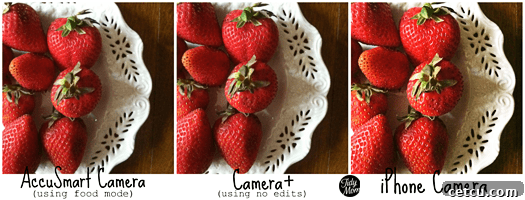
Accu Camera is a relatively new addition to my suite of photography apps, and while I’m still in the early stages of exploring its full potential, the initial impressions and buzz surrounding it are incredibly promising, particularly for anyone passionate about food photography. This innovative application stands out for its specialized algorithms designed specifically to enhance food images. It’s reported to automatically correct and optimize various aspects of your food photos, targeting critical elements such as brightness, color saturation, exposure levels, and texture definition. The ultimate goal of Accu Camera is to make your culinary creations look as appetizing and vibrant in a photograph as they do in real life. By intelligently tweaking these visual parameters, the app aims to give your food pictures that irresistible “delicious taste,” ensuring they entice viewers and accurately represent the quality of your dishes. For food bloggers, home cooks, or anyone who loves sharing their gastronomic adventures, Accu Camera could be a game-changer. The most delightful part? This focused and effective editing tool is available completely FREE!, making it an accessible and essential download for elevating your food photography game.

4. MoreBeaute2: Effortless Beauty Enhancements for Portraits
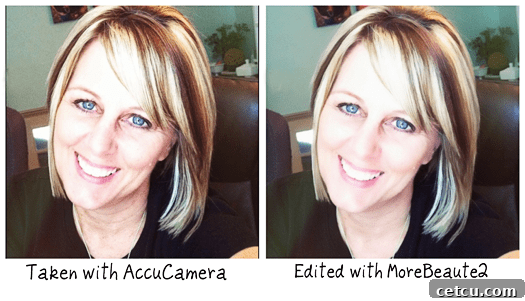
While not a camera app in the traditional sense, MoreBeaute2 shines as an indispensable editing app designed to perfect your portrait photos. It’s an ideal tool for anyone looking to present their best self in pictures without requiring extensive photo editing knowledge or complicated software. The app’s core functionality focuses on enhancing natural beauty, making you look both radiant and stunning with remarkable ease. MoreBeaute2 works by intelligently brightening and lightening your skin tone, while simultaneously smoothing out any imperfections, all in just two incredibly simple steps. You don’t need to be a makeup artist or a photo editor to achieve professional-looking results; the app does the heavy lifting for you. This makes it perfect for quick touch-ups on selfies, profile pictures, or any portrait where you want to add a polished, flawless finish. For an app that delivers such noticeable and flattering enhancements with minimal effort, its price tag of FREE! makes it an absolute must-have for anyone seeking to elevate their portrait photography on their iPhone.

5. Picture Show: Nostalgic Filters and Creative Flair for Your Photos
Picture Show is another fantastic app that, while I haven’t yet had extensive time to delve into its full capabilities, came highly recommended by my good friend Diane, whose photographic eye I deeply trust. Her glowing reviews convinced me that this app was an essential addition to my creative toolkit. PictureShow excels at giving your iPhone photos a distinctive, vintage aesthetic, making them appear as if they were captured with a classic film camera. This retro charm is highly sought after, and PictureShow delivers it beautifully through its various filters and effects. Beyond its impressive vintage transformations, the app also offers a wealth of special effects that can dramatically alter the mood and style of your images. What truly sets PictureShow apart, however, is its versatility in customization. You can easily add a wide selection of frames and borders to complement your composition, or even incorporate text overlays to tell a deeper story or add a personal touch. This comprehensive suite of tools allows you to tweak your photos to your heart’s content, ensuring each image perfectly reflects your artistic vision. For an affordable price of $1.99, PictureShow provides endless creative possibilities for giving your iPhone photos a unique and memorable character.
6. iMovie: Crafting Cinematic Stories Right From Your iPhone
Last but certainly not least, iMovie is nothing short of AMAZING for producing high-quality movies directly from your iPhone. Its capabilities for mobile video editing are truly groundbreaking. My enthusiasm for this app really took off during the EVO conference when Diane Cu shared incredible details about the stunning films she had been creating solely with her iPhone. She emphasized how remarkably easy and intuitive the process was, even for someone new to video editing. Her glowing endorsement was all the encouragement I needed. As soon as I returned home, I eagerly downloaded iMovie – though a crucial tip for anyone looking to do the same is to ensure you’re connected to a stable WiFi network, as the download can be substantial. The power of iMovie on the iPhone lies in its comprehensive yet user-friendly interface. You can effortlessly combine various media types, including still pictures, video clips, and text overlays, to build your narrative. Moreover, the app allows for the seamless integration of background music to set the mood and even offers the option to record voice-overs, adding a personal and professional touch to your projects. This level of functionality, all accessible from a device that fits in your pocket, is truly revolutionary for mobile content creation. All this incredible video editing power is available for a one-time purchase of just $4.99, making it an exceptional investment for aspiring filmmakers and memory keepers alike.
My first attempt at using iMovie was a fantastic learning experience. While I know there’s so much more I can accomplish with this powerful tool, I was thrilled with the results of my initial project. Here’s a brief recap of my trip to Utah for EVO ’11, sponsored by Bush’s Beans. This entire video, from shooting to editing, was produced exclusively on my iPhone and then uploaded to YouTube. The entire process, including the time I spent familiarizing myself with the app’s features and learning the ropes of mobile video production, took me approximately an hour and a half. It truly showcases the accessibility and efficiency of iMovie for creating compelling video content on the go.
For more inspiration, you absolutely have to check out the amazing video projects Diane is creating with her iPhone. Her work truly demonstrates the incredible professional quality achievable with this accessible tool.
Beyond My Current Favorites: iPhone Camera Apps on My Wish List
The world of iPhone photography apps is constantly evolving, with new and exciting tools emerging regularly. My journey into mobile photography is far from over, and I always keep an eye out for apps that can further expand my creative horizons. Here are a few more camera apps that have caught my attention and are currently sitting on my wish list, eagerly awaiting their turn to be explored:
Hipstamatic ($1.99): Known for its stunning vintage camera simulations and unique film effects, Hipstamatic offers a distinct aesthetic that can transform everyday photos into artistic masterpieces. Its randomized approach to filters encourages experimentation and happy accidents.
Lo-Mob ($1.99): This app specializes in recreating the look of classic Lomography cameras, providing gritty textures, vibrant colors, and light leaks that evoke a nostalgic, analogue feel. It’s perfect for adding a raw, artistic edge to your mobile shots.
Quad Camera ($1.99): Offering a unique multi-shot capability, Quad Camera captures four sequential images in a single frame, creating dynamic photo collages that tell a story over a short period. It’s an imaginative way to capture action or reveal different facets of a scene.
WHEW! As you can see, I’m genuinely addicted to discovering and utilizing these fantastic tools! The possibilities for creativity with an iPhone are truly endless. I’m always eager to learn about new apps and workflows, so I’d absolutely love to hear what camera apps you are currently using and loving on your iPhone! Sharing our favorite tools is a wonderful way to inspire and discover new ways to capture the world around us.
I’m Lovin…. camera apps for my iPhone!
Get Button Code
Now it’s your turn to share what you’re loving! Please remember to link back to https://Tidymom.net when you join our “I’m Lovin’ It Fridays” link-up.
Curious about what “I’m Lovin’ It Fridays” is all about? Get all the information, how-to guides, troubleshooting tips, and grab your button here.