
Every photographer, from the seasoned professional to the enthusiastic amateur, understands the magic of capturing a moment. Whether it’s the joyful laughter of family, the serene beauty of a landscape, or the intricate details of a culinary creation, a photograph freezes time, preserving memories and emotions. However, the journey from a raw image captured by your camera to a truly captivating masterpiece often requires more than just a click of the shutter. This is where the art of photo editing, or post-processing, comes into play, transforming good photos into extraordinary ones.
Elevate Your Photography: Mastering Photo Editing with Totally Rad RadLab
For many years, I’ve poured my passion into photography, constantly learning and experimenting to bring my visual ideas to life. As a self-taught photographer and Photoshop user, I’ve often sought tools that could bridge the gap between my vision and the final image, especially when facing the time-consuming nature of detailed editing. The process of enhancing photos, while rewarding, can indeed be a significant investment of time, requiring meticulous adjustments to lighting, color, contrast, and countless other parameters. This challenge often leaves photographers searching for solutions that offer both efficiency and exceptional results.

The quest for a streamlined yet powerful editing workflow led me to a remarkable discovery: Totally Rad and their exceptional Photoshop plug-in, RadLab. If you appreciate the instant artistic transformations offered by filters on platforms like Instagram, but crave professional control and versatility within your desktop editing environment, then RadLab is poised to become your new favorite tool. It’s designed to simplify complex editing tasks, making professional-grade image enhancements accessible to everyone, regardless of their Photoshop expertise.
The Power of Intuitive Editing: Introducing Totally Rad RadLab
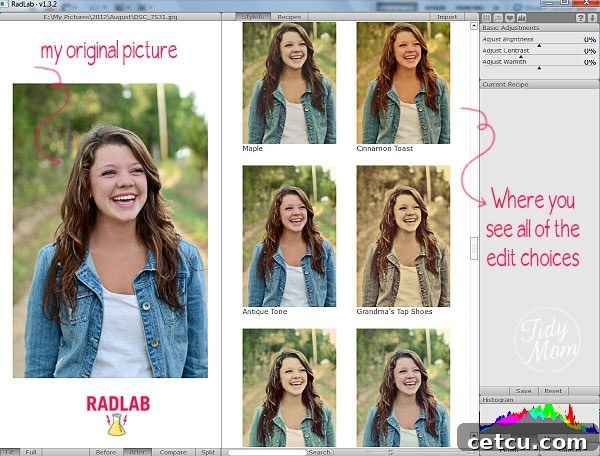
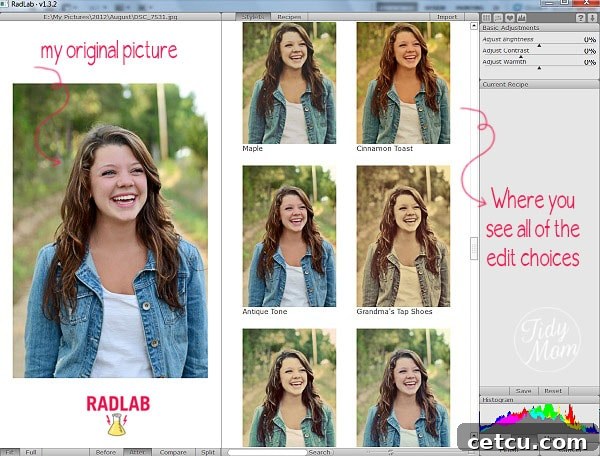
RadLab redefines the photo editing experience. The moment you open your picture in Photoshop and launch RadLab, you are instantly immersed in a world of creative possibilities. This innovative plug-in offers a vast collection of 78 distinct presets, affectionately known as “Stylets,” each designed to evoke a specific mood, style, or aesthetic. Imagine being able to “try on” different looks for your photo with a single click, much like trying on outfits, until you find the perfect fit. From vintage charm to vibrant modernity, dramatic black and white to subtle color enhancements, the Stylets provide an unparalleled starting point for any creative vision.
Beyond Single Presets: Crafting Your Signature Style with RadLab Recipes
What truly sets RadLab apart is its ability to empower users to go beyond individual presets. The real magic unfolds when you begin to combine these Stylets, layer them, and fine-tune their intensity. This flexible approach allows you to create your own unique editing “recipes.” These custom combinations are not just a static application; you have full control to adjust each component, ensuring your final image precisely matches your artistic intent. This capability is incredibly powerful for developing a consistent visual style across your entire body of work, a crucial element for branding and artistic recognition.
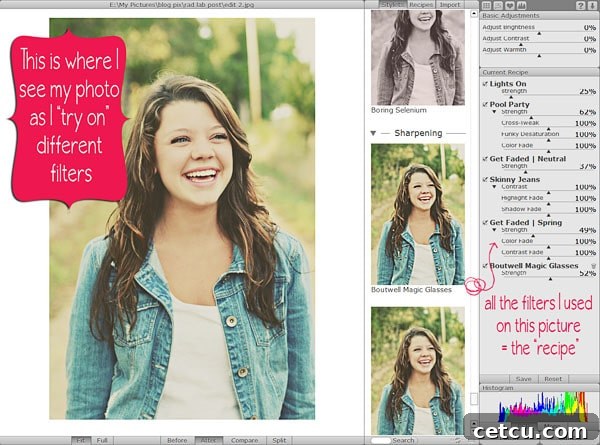
The genius of RadLab Recipes becomes particularly evident when you need to apply a specific look to multiple images. Think of a portrait session, a wedding, a series of food photographs for a blog, or a travelogue. Instead of manually replicating adjustments for each photo, you can save your custom recipe and apply it consistently across an entire set. This dramatically streamlines your workflow, saving countless hours and ensuring a cohesive aesthetic. For a live demonstration of RadLab’s capabilities and how recipes work, you can visit their website to see RadLab in action.
Streamlining Your Photography Workflow: Efficiency Meets Excellence
One of the most significant advantages of integrating RadLab into your editing process is the profound impact it has on efficiency. For self-taught photographers, and indeed for anyone juggling a busy schedule, editing can often feel like a bottleneck. RadLab effectively demolishes this barrier, allowing you to achieve professional-level results in a fraction of the time. Whether your goal is a simple enhancement like sharpening details, lightening shadows, or brightening an overall image, RadLab makes these fundamental adjustments incredibly straightforward. Its intuitive interface and real-time previews mean you can visualize the impact of your edits instantly, reducing guesswork and speeding up decision-making.
In mere moments, I can cycle through dozens of distinct looks for a single photograph, experimenting with various combinations and adjustments. The sheer breadth of possibilities is truly liberating. The biggest challenge often isn’t finding a suitable edit, but rather deciding which of the many stunning final versions I love the most!
My Favorite RadLab Recipes for Creative Inspiration
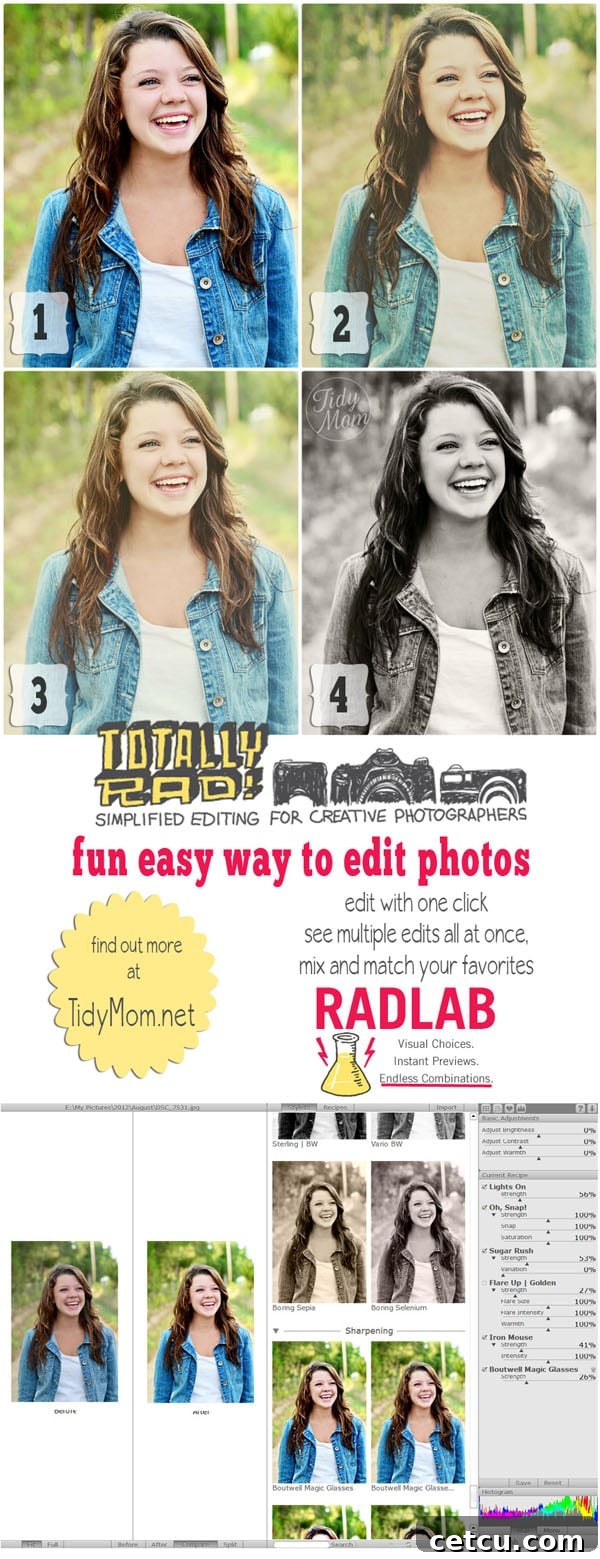
To give you a glimpse into the creative potential of RadLab, here are some of the “recipes” I used on the photograph of my lovely niece, showcasing how different combinations can achieve varied and compelling results:
- Recipe 1: Warm & Vibrant – Lights On + Oh Snap + Sugar Rush + Flare Up | Golden + Iron Mouse + Boutwell Magic Glasses. This combination often yields a bright, energetic image with a lovely golden glow, perfect for cheerful portraits.
- Recipe 2: Soft & Dreamy – Lights On + Pool Party + Get Faded | Neutral + Skinny Jeans + Get Faded | Spring + Boutwell Magic Glasses. This recipe tends to create a softer, slightly faded look with a gentle, spring-like color palette, ideal for a more ethereal feel.
- Recipe 3: Retro & Atmospheric – Lights On + Oh Snap + Flare Up | Faded + Troy + SX-70 + Boutwell Magic Glasses. For a nostalgic or vintage aesthetic, this mix introduces faded tones and classic film-like qualities, adding character and depth.
- Recipe 4: Timeless Monochrome – Bitchin BW + Vario BW + Boring Sepia + Boutwell Magic Glasses. Sometimes, nothing beats the classic elegance of black and white. This recipe offers a rich, nuanced monochrome conversion with a hint of sepia for warmth, bringing out textures and emotions.
These examples merely scratch the surface of what’s possible. The ability to experiment, layer, and adjust means you are only limited by your imagination. RadLab isn’t just a tool; it’s a creative playground that invites you to explore new visual dimensions for your photographs.
Who Benefits from Totally Rad RadLab?
RadLab is an invaluable asset for a diverse range of users:
- Hobbyist Photographers: For those who love taking pictures but find traditional editing intimidating or too time-consuming, RadLab offers a gentle entry point into advanced post-processing.
- Bloggers & Content Creators: Consistency in visual branding is key. RadLab allows bloggers to quickly apply a signature look to all their images, from lifestyle shots to food photography, ensuring a cohesive and professional online presence.
- Small Business Owners: Whether it’s product photography for an e-commerce store or images for marketing materials, RadLab helps businesses create high-quality visuals without needing extensive graphic design expertise or hiring external editors.
- Event & Portrait Photographers: The ability to batch-process photos with custom recipes is a game-changer for photographers who handle large volumes of images from weddings, family sessions, or corporate events.
- Seasoned Professionals: Even experienced photographers can benefit from RadLab’s speed and versatility, using it for quick edits, creative explorations, or as a powerful complement to their existing workflow.
I personally use RadLab on almost all of my food pictures, transforming them from simple captures into delectable visual stories. Its versatility truly shines across various genres.
Getting Started with RadLab: Compatibility and a Free Trial!
If you’re a Photoshop user and haven’t yet explored the capabilities of RadLab, I wholeheartedly encourage you to give it a try. It’s a tool that genuinely transforms the editing process, making it more enjoyable, faster, and yielding significantly more impressive results. What’s even better? You can experience the full power of RadLab for yourself with a FREE 30-day trial! This risk-free opportunity allows you to fully integrate it into your workflow and witness its impact firsthand before making any commitment.
RadLab is compatible with Photoshop CS3 or later and Photoshop Elements 7 or later, ensuring broad accessibility for a wide range of users. Its seamless integration means you won’t need to learn a new standalone application; it works directly within your familiar Photoshop environment.
Final Thoughts: Transform Your Images with RadLab
In conclusion, Totally Rad RadLab stands out as an indispensable tool for anyone serious about improving their digital photography. It masterfully balances ease of use with professional-grade results, cutting down on editing time while expanding creative possibilities. From instantly applying captivating looks with its extensive Stylet library to meticulously crafting your unique visual signature with custom recipes, RadLab empowers you to achieve the photographs you’ve always envisioned. Stop struggling with lengthy editing processes and unlock a world where efficiency and creativity coexist. Give RadLab a try today and elevate your photography to new heights.
Affiliate Disclaimer
Please note: The link to RadLab provided in this article is an affiliate link. This means I may earn a small commission (enough to buy the occasional coffee) if you make a purchase through this link. Rest assured, this affiliation does not influence my genuine enthusiasm or honest views; I wholeheartedly recommend RadLab because I truly believe in its value and effectiveness.
Share Your Favorite Editing Tips!
We love hearing about your creative journey! What are your go-to photo editing tools or techniques this week? Share your insights and help inspire our vibrant community.
Feel free to link back to TidyMom.net for more photography tips and creative inspiration.
What is “I’m Lovin’ It Fridays” and how to participate? Get all the information, how-to guides, troubleshooting, and buttons here.