Giveaways
Eye-Fi Memory Card – Never need a camera cord again
Never need camera cords again. Send your photos to your camera and online sharing sites instantly
This post brought to you by Eye-Fi. All opinions are 100% mine.
I love sharing my pictures with my friends and family on Facebook and Flickr, but getting my pictures from my camera to online can sometimes be such a pain. The pictures end up sitting on my camera for months until I forget about them.
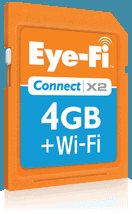
I was thrilled when I was contacted to do a review for the Eye-Fi Memory Card. This tiny little gadget just may change your life! Eye-Fi looks just like a standard sd card and fits any sd camera. But this sd card has a little secret trick……it has a wifi transmitter! What does that mean exactly? It means no cords or card reader needed to get your pictures on your computer or even online!!
Let me give you a scenario……….You’re having your child’s birthday party at your house, you’ve already installed Eye-Fi on your computer (super duper easy) and you have the Eye-Fi memory card in your camera. You take a few shots of pin the tail on the donkey, set the camera down, turn it on, and Eye-Fi will load your pictures right to Facebook for you, while you get the cake ready to serve!

Take a few more pictures of the cake and your little cutie blowing out the candles, and Eye-Fi uploads them to Facebook while you lick chocolate cake off your fingers! How’s THAT for EASY!! Eye -Fi does all the work for you!
– The Eye-Fi memory card (SDHC) replaces your existing memory card but does a lot more: * Automatically organizes your photos & videos into date based folders * Saves you time by using your Wi-Fi network instead of hunting for cables or card readers * Your photos are already waiting for you – whether you want to print a photobook, scrapbook or share your favorites on your online site All you have to do is turn your camera on!!
What’s required to use an Eye-Fi card: 1.) Compatible SDHC camera (to check if your camera is compatible, please visit https://support.eye.fi/cameras) 2.) Wi-Fi network 802.11b/g/n 2.4Ghz 3.) Broadband Internet 4.) Windows XP/Vista/7 or Mac OS X 10.5 and up Watch the video to see how easy it is!